
When creating or redesigning a business website, a common question is: what criteria can help assess its quality objectively?
Website reviews are often reduced to subjective judgments (“I like it” or “I don’t like it”). A site can generate inquiries with a simple or dated interface when there is demand. The aim of careful design is not to make something beautiful for its own sake, but to make the service easier to use and understand. Dieter Rams summed up his design principles as usefulness, simplicity, and precision.[5]
Web standards and frameworks provide verifiable criteria for assessing a site’s accessibility, performance, and structure.[2][3][4]
1. Shared benchmarks rather than a single authority
Unlike some industrial sectors, the web has no single worldwide organization that governs it or requires websites to obtain certification. Web quality draws on shared work and open frameworks developed by technical communities, usability specialists, and other people working in the field:
- World Wide Web Consortium: an international body that publishes web standards. The hypertext markup language Living Standard is maintained by the Web Hypertext Application Technology Working Group.[3][4]
- Google Core Web Vitals: page-experience metrics for loading performance, responsiveness, and visual stability. Google recommends good results but notes that they do not guarantee a high position in search results.[2]
- Digital accessibility: international web content accessibility guidelines guide the design of accessible web content. France also has the French framework for improving digital accessibility.[4][8]
- Opquast (Open Quality Standards): a French framework of verifiable web-quality practices.[1]
- General Data Protection Regulation: it sets out principles including data minimization and data protection by design.[7]
These benchmarks are complemented by recognized work on interface usability (Jakob Nielsen, Amélie Boucher, Bastien and Scapin) and digital sustainability criteria.[6][9]
2. The model of visibility, perception, technical quality, content, and services: five dimensions of user experience
The model of visibility, perception, technical quality, content, and services is one way to look at web quality as a whole without getting lost in jargon. Created by Élie Sloïm and Éric Gateau, it structures a user’s experience across five chronological dimensions.[13]
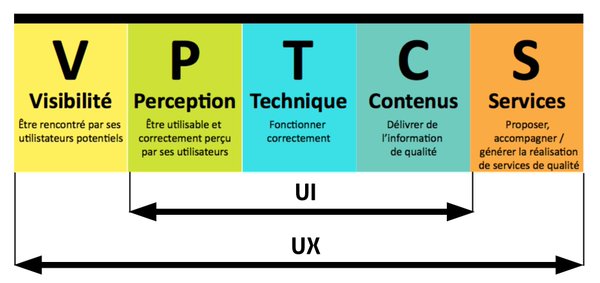
- Visibility (before the visit): help people find the service they are looking for through a semantic structure that search engines can understand.
- Perception (when the page opens): welcome visitors with a clear visual hierarchy and suitable contrast from the first moments.
- Technical quality (during the visit): make the site fast and stable across devices, without unnecessary code slowing down the browser.
- Content (to inform and reassure): provide clear explanations, concrete evidence, and transparent information about who publishes the site.
- Services (to take action): make contact options and useful features easy to reach, without unnecessary obstacles or oversized forms.
As the diagram shows, the Perception, Technical, and Content dimensions make up the user interface, while the full path from Visibility to Services represents the overall user experience.
3. Web quality and CRO: removing the first barriers to conversion
For Tanea, sound CRO starts with an accessible, reliable experience: standards help identify and remove early usability barriers, while analysis of visitor needs and journeys informs the improvements to test.
A. Perceived speed and stability (Core Web Vitals)
- time to display the largest content element ≤ 2.5 seconds: measures how long the largest visible element takes to appear. Google considers a value of 2.5 seconds or less good.[2]
- cumulative page layout shift < 0.1: measures visual stability while a page loads.[2]
- time from an interaction to the next screen update < 200 milliseconds: measures how quickly a page responds to user interactions.[2]
B. Mobile usability and touch accessibility
- Pointer targets (criterion 2.5.8, intermediate conformance level): this accessibility criterion sets a minimum size of 24×24 pixels, except where its exceptions apply. Criterion 2.5.5, highest conformance level, sets a minimum target size of 44×44 pixels, subject to its exceptions.[4]
- Color contrast (criterion 1.4.3): normal text must reach a contrast ratio of 4.5:1, subject to the criterion’s exceptions.[4]
- Accessible forms (criteria 3.3.1 and 3.3.2, baseline conformance level): criterion 3.3.1 requires automatically detected input errors to be identified and described in text; criterion 3.3.2 requires labels or instructions for input fields.[4]
C. Transparency and reassurance (Opquast and legal requirements)
- Identifying the publisher (Opquast / French law on confidence in the digital economy): provide the information required to identify the publisher and host under applicable rules.[1][11]
- Clarity about the service: explaining what the business does and does not handle can help qualify inquiries and answer questions before first contact.
D. A considered user journey and data ethics
- A less obstructive experience: a consent banner that covers the page can make it harder to use. Respect for privacy also means limiting data collection to what is needed for the stated purpose and following the rules for cookies and other trackers.[7][12]
4. How these requirements guide our design and engineering choices
For a consultant or development team focused on results, these standards are not boxes to tick at the end: they shape project decisions, from design to code.
Design: structure before decoration
- A token-based design system: rather than setting sizes arbitrarily from mockups, we structure interfaces around a strict system of design tokens. Type scales, line heights, and vertical spacing are mathematically calibrated to create a comfortable, predictable visual hierarchy.
- Restrained use of the action color: to guide attention without ambiguity, the bright accent color is reserved for primary conversion actions (audit requests, direct calls). It is never diluted across decorative badges, secondary borders, or filler elements.
- Reading ergonomics: long explanatory copy is consistently left-aligned to support natural scanning. Centered text is reserved for short headings and final calls to action.
Code: technical simplicity in service of performance
- A static-first approach (hypertext markup language and cascading style sheets): generating code in advance can reduce the work the browser has to do before showing content. Performance still needs to be measured on real pages because it also depends on resources and viewing conditions.[10]
- Astro as a modern example of this approach: this is why we favor modern component-based architectures such as Astro, alongside static site generators. By delivering pure markup by default (zero kilobytes of unnecessary client-side JavaScript on content pages) while preserving modular development, this tooling ensures loading speed is not sacrificed for design convenience.
- Native browser standards: use native web features (
<dialog>for accessible modals,<details>for expandable sections, and native form validation) rather than stacking third-party libraries that add page weight and may introduce security vulnerabilities. - Locally hosted assets: self-hosting fonts and optimizing media at the source eliminates requests to third-party servers, removes latency from the domain name system, and protects visitor privacy.
5. Website review: signs to check on your current site
If you want to review your current website or assess a provider’s proposal for a redesign, these four practical tests do not require programming knowledge:
- The bright-daylight mobile test: go outside during the day and browse your site on your phone. Can you read the text without zooming? Can you tap phone numbers with one thumb?
- The mobile first-screen test: clear your mobile browser cache and load your homepage using mobile data. Do you wait more than two or three seconds before the first paragraph appears? Does the layout shift as images load?
- The reassurance test: can a visitor find your identity, address, and business status in under five seconds?
- The easy-arrival test: can visitors reach the information they need straight away, or does a cookie banner or pop-up cover the screen as soon as they arrive?
6. Further reading
The references below provide more information about these frameworks and the work of the specialists mentioned in this article:
References & Publications
- Élie Sloïm and Laurent Denis, Qualité et conformité des services numériques – Fondamentaux, méthode et référentiel Opquast [Quality and compliance of digital services: foundations, method, and the Opquast framework], Éditions Eyrolles.
- Google Search Central, Core Web Vitals and Google Search results (external link, opens in a new tab).
- Web Hypertext Application Technology Working Group, living standard for the hypertext markup language (external link, opens in a new tab).
- World Wide Web Consortium, Web Accessibility Initiative, international web content accessibility guidelines version 2.2 (external link, opens in a new tab).
- Dieter Rams, ten principles for good design (external link, opens in a new tab).
- Nielsen Norman Group, 10 usability heuristics (external link, opens in a new tab).
- General Data Protection Regulation, Articles 5 and 25 (external link, opens in a new tab).
- French interministerial digital directorate, French framework for improving digital accessibility (external link, opens in a new tab).
- World Wide Web Consortium, web sustainability guidelines (external link, opens in a new tab).
- Astro documentation, pages and static rendering (external link, opens in a new tab).
- French law on confidence in the digital economy, Article 6 (external link, opens in a new tab).
- French data protection authority, rules for cookies and other trackers (in French) (external link, opens in a new tab).
- Opquast, the visibility, perception, technical quality, content, and services model: history and overview (external link, opens in a new tab).